Frequently Asked Question
Courses: How do I make a course available to my students?
Last Updated 6 months ago
Updated here:Â
How do I make a course available to my students?
- Opening a course: To open your course to the students, please follow these instructions.
- Click on “Click here to update settings� found in a banner at the top of your site. Here is an example:
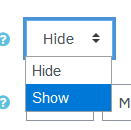
- Change the "Course visibility" from Hide to Show
- Scroll to the bottom and click “Save and display�
- Your browser will return you to the front page of the course and the closed warning label will be gone.
- Click on “Click here to update settings� found in a banner at the top of your site. Here is an example: